


ProBooks: Invoice Maker
4.7731.00 Reviews
App Specs
- Version
- 10.98
- Updated On
- License
- Free
- Downloads
- 100,000+
- Developer
- Brian Augsburger
- Categories
- Business
- Platform
- Android
Screenshots

 Analysis by AppCompare
I tend to judge an invoicing app by what happens on an ordinary workday: can I turn a finished job into a clear bill, keep track of what is still owed, and get back to the work that earns the money? ProBooks: Invoice Maker is built around that practical need. It is a free business app from developer Brian Augsburger, and its focus is on bringing invoices, estimates, expenses, and payment follow-up into one mobile workflow. I think it makes the most sense for independent workers and small operations that want a more organized routine without starting with a complex accounting system.
It is not a magic fix for every part of running a business, and I would not choose an invoicing app based on a polished invoice alone. The useful question is whether its everyday tools match the way you handle clients and records. My take is that ProBooks has a promising combination of approachable invoice creation and basic tracking, but it rewards users who establish a consistent process rather than expecting the app to make business decisions for them.
From a first invoice to a repeatable routine
I'm always on the hunt for an app that makes life a bit easier, and when I stumbled upon ProBooks: Invoice Maker, I knew I had to give it a spin. If you're a freelancer or a small business owner like me, you know how crucial it is to keep your invoicing game on point. So, let's dive into everything this app has to offer!
First Impressions
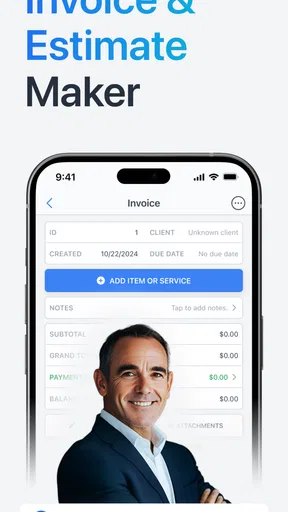
Right off the bat, ProBooks: Invoice Maker boasts a sleek and user-friendly interface. The app is available on both Android and iOS, making it super accessible no matter what device you’re rocking. I found the setup process pretty straightforward, and within minutes, I was ready to roll out my first invoice. The clean design and intuitive navigation make it a breeze to use, even if you’re not the most tech-savvy person out there.
That quick start is helpful, but I would still treat setup as a small business task rather than something to rush through. A client name entered consistently, a clear description of work, and a sensible approach to expenses make later records easier to understand. The practical payoff comes when you revisit an invoice weeks later and can tell at a glance what it covered and whether it needs attention.
Features that Stand Out
Now, let’s talk features because, honestly, this is where the app shines. ProBooks comes packed with tools that are essential for any business owner.
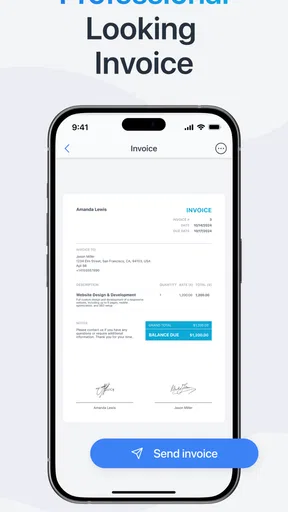
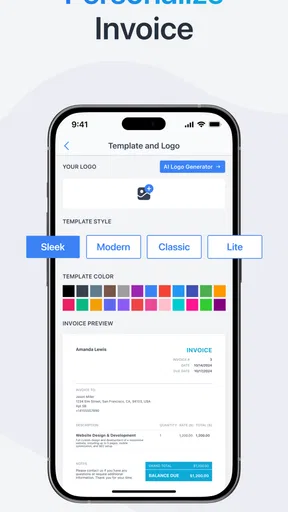
- Customizable Invoices: Whether you want to add your logo, adjust colors, or tweak the layout, ProBooks lets you do it all. It’s all about making those invoices look professional and uniquely yours.
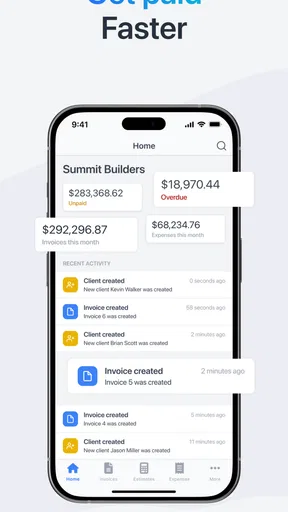
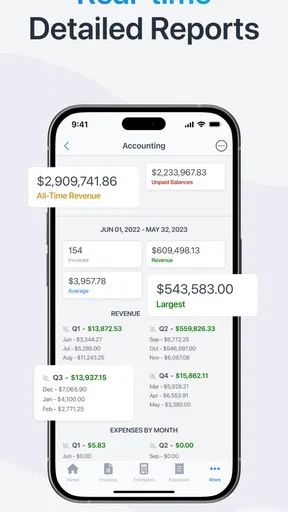
- Payment Tracking: This feature is a lifesaver. You can easily track which invoices have been paid and which are still outstanding, helping you stay on top of your cash flow.
- Estimates and Quotes: Before diving into full projects, you can send estimates and quotes to clients. It’s a great way to lay the groundwork and ensure everyone’s on the same page.
- Expense Tracking: Keep tabs on your expenses with a simple and efficient tracking system. You can even snap photos of receipts to store them directly within the app.
Those tools work best as a connected habit. For example, I would create an estimate before beginning a job, then use the same project details as a reference when preparing the final invoice. That makes it easier to keep the agreed scope and the amount billed aligned. For expenses, photographing a receipt soon after buying supplies is more useful than leaving a pile of paper to sort at the end of the month; the image gives context while the purchase is still fresh in your mind.
Worth Reading Before You Choose

EA SPORTS FC Mobile 26 Is a Bigger Football Game, but It Takes Time

Flipboard Shows What News Apps Must Do Beyond the Feed

Switching to Android Auto Means Rethinking Your Driving Routine

Google Calendar Makes a Crowded Week Easier to Manage

Ludo King Makes the Most of the Minutes Between Plans

Baby Panda World Brings Quick Play to Modern Phones, but Its Game Library Feels Busy
A small but important trade-off is that tracking is only as reliable as the entries you make. If you record a payment late, or save an expense without enough context to recognize it later, the app cannot make that record clearer for you. I would use short, specific descriptions rather than vague labels, especially when several jobs involve similar materials or services. That habit improves the usefulness of your records without requiring a complicated bookkeeping routine.
Using the App Daily
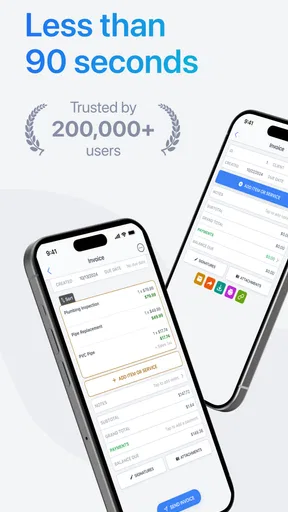
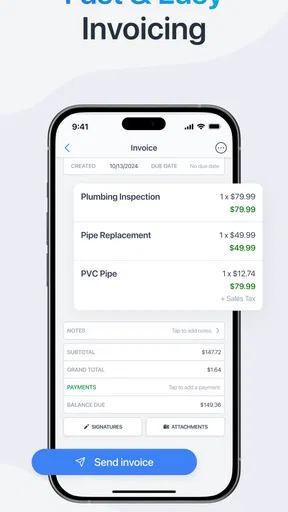
After integrating ProBooks into my daily routine, I noticed an immediate boost in productivity. Creating invoices is quick and painless, and I love how I can send them directly via email. Clients have even complimented the professional appearance of my invoices, which is always a nice ego boost!
One realistic use is a freelance repair worker finishing a visit between appointments. They can note the completed work, prepare an invoice while the details are still clear, send it by email, and later check whether it has been paid. If the job began with an estimate, that earlier step helps keep the final bill connected to what the customer expected. The value here is less about elaborate automation and more about reducing the number of details the worker has to remember after moving on to the next task.
One of the features I find invaluable is the automated reminders for unpaid invoices. Let’s face it, chasing after payments can be awkward, but ProBooks takes care of those uncomfortable nudges for you. It’s like having a personal assistant keeping an eye on your finances.
I would still review outstanding invoices rather than assuming a reminder replaces follow-up altogether. A reminder can handle a routine nudge, while a personal message may be more appropriate if a client has a question or a project has changed. Separating those situations helps keep communication professional: let the standard process deal with ordinary late payments, and step in yourself when the relationship or circumstances call for a conversation.
Settings worth checking before you settle in
Before relying on any invoice maker, I would take a moment to check the choices that shape the documents clients receive. ProBooks supports invoice customization, so it is worth deciding on a restrained, consistent look rather than changing the design for every job. A recognizable business identity and readable layout matter more than decorative tweaks. If the invoice is easy to scan, the client can focus on the work, amount, and payment status.
I would also make a deliberate choice about how estimates become invoices in my own workflow. Keep the wording for a job clear, and review the final document against what was agreed before sending it. This is particularly useful when a project changes halfway through: the app can help organize the paperwork, but it is still up to me to make sure the updated scope is described accurately. That distinction prevents a convenient tool from becoming a source of misunderstandings.
Another useful habit is to decide when I will record expenses. If I wait until a busy week is over, even a receipt photo may not tell me which client or project it belongs to. I would add a brief note while capturing it, where appropriate, and check the expense list as part of a regular admin session. That is a simple way to make receipt storage more than a digital drawer.
Faster patterns for repeat work
For someone who bills for similar work repeatedly, the best time-saving move is a stable routine, not trying to make every invoice from memory. I would keep a personal checklist of the details I need before sending: client, work description, amount, and any expenses that belong with the job. A quick pass through the checklist catches omissions before the invoice leaves my hands, while consistent wording makes a group of records easier to review later.
Estimates can also serve as a useful pause point. When a client asks for work, I would put the proposed scope in an estimate and confirm that it reflects the conversation before treating it as a commitment. Once the work is finished, comparing the invoice with that estimate helps me spot a changed task or cost. This is especially handy for freelancers whose projects are small enough to handle themselves but varied enough that details can blur together.
The email-sending workflow is convenient, but I would make the message itself part of the routine: identify the work plainly, keep the tone friendly, and make the next step clear. That does not require a long note. It simply makes the invoice feel like part of a professional exchange rather than an unexplained attachment. With payment tracking and reminders available, I would then return to the app at a regular time instead of checking obsessively after every job.
Where the mobile approach has limits
Sure, no app is perfect and ProBooks is no exception. While the app does a fantastic job overall, I did notice that the mobile version lacks some of the advanced features found on the desktop version. It’s nothing deal-breaking, but something to keep in mind if you often switch between devices.
That limitation matters most when invoicing is only one part of a larger finance process. If you need to coordinate detailed records across a team, build management reports, or handle bookkeeping beyond invoices and expenses, a full accounting platform may be a better fit. A spreadsheet can also be enough for someone who sends only occasional bills and is comfortable managing follow-up manually. ProBooks sits between those approaches: more structured than a basic sheet, but not necessarily a replacement for every financial tool a growing business may need.
Another point is the learning curve associated with some of the more complex features. If you're new to invoicing apps, you might need to spend a little extra time getting familiar with all the bells and whistles. But once you get the hang of it, it's smooth sailing.
I would not recommend it as the sole source of truth for a business that has intricate accounting needs or requires a carefully coordinated desktop process. Switching between mobile and desktop can also interrupt a workflow if the tasks you need are not equally convenient on both. If your work is mostly on a phone and your records are straightforward, that compromise may be acceptable; if you regularly prepare detailed accounts from a computer, compare the desktop experience with your requirements before committing your whole process to it.
ProBooks is free to start using, with in-app purchases ranging from $2.99 to $149.99 per item, so I would check what a paid option covers before deciding whether it is worth it for my workload. The app is rated for Everyone, has an average rating of 4.7 from around 2.7 thousand ratings, and has been installed over 100 thousand times. It was released on March 4, 2013, and its current version is 10.95, with Android 7.0 or newer required. Those details give a little context, but they do not replace the practical test: can I create and track the documents I actually need without adding friction?
Who will get the most from it
I see ProBooks as a good match for freelancers, independent tradespeople, and small business owners who want a mobile way to create invoices, send them by email, track payments, and keep expense receipts together. It is especially appealing if you currently rely on memory or scattered notes to know which client still owes you. The estimates and quotes are useful when work needs a clear proposal before it turns into a bill, while customization helps keep client-facing documents consistent.
It is less compelling for someone who only sends a bill now and then and already has a simple method that works. It may also be the wrong choice for a team that needs advanced accounting, tightly shared workflows, or desktop tools at the center of daily operations. In those cases, I would compare it with a broader accounting service or keep a simpler invoicing method rather than paying for features that do not solve the real problem. The right choice depends on whether your main headache is preparing and following up on invoices, or managing the whole financial picture.
Final Thoughts
Overall, ProBooks: Invoice Maker is a solid choice for anyone looking to streamline their invoicing process. Its robust set of features and ease of use make it a top contender in the invoicing app world. Whether you’re a seasoned business owner or just starting out, this app has the tools to help you keep your finances in check.
If you’re tired of juggling spreadsheets and want an all-in-one solution, give ProBooks a shot. You might just find it’s the game-changer your business needs. Happy invoicing!
My practical recommendation is to try it with one real client workflow before moving every record over: create an estimate, complete a job, send the invoice, record a payment when it arrives, and see whether the steps feel natural on your phone. That small trial answers the questions that matter most—whether the documents suit your business, whether tracking is easy to maintain, and whether the mobile limits affect your routine. For a solo operator who wants a repeatable invoicing habit, that is a sensible place to start.
Pros
- User-friendly interface for quick access.
- Customizable templates for brand consistency.
- Supports multiple currencies.
- Secure data backup and sync.
- Real-time invoice tracking.
Cons
- Limited free version features.
- Occasional syncing issues reported.
- No offline mode available.
- Customer support could be improved.
- Subscription can be pricey for small businesses.
FAQs for ProBooks: Invoice Maker
What features does ProBooks: Invoice Maker offer?
ProBooks: Invoice Maker provides a comprehensive suite of features designed for small businesses and freelancers. Users can create professional invoices, track expenses, manage clients, and monitor payments. The app also offers customizable invoice templates, automatic tax calculations, and the ability to send reminders for unpaid invoices, making it an essential tool for efficient financial management.
Is ProBooks: Invoice Maker available on both Android and iOS?
Yes, ProBooks: Invoice Maker is available for download on both Android and iOS platforms. This ensures that users can access their invoices and manage their financial tasks seamlessly across different devices, whether they're using a smartphone or a tablet.
Does ProBooks: Invoice Maker offer any integrations with other apps?
ProBooks: Invoice Maker integrates with several popular accounting and payment platforms, such as QuickBooks and PayPal. This allows users to streamline their accounting processes and accept payments directly through the app, enhancing productivity and reducing manual data entry.
Is there a free version of ProBooks: Invoice Maker, or does it require a subscription?
ProBooks: Invoice Maker offers both a free version and a premium subscription. The free version provides basic invoicing capabilities, while the premium subscription unlocks advanced features like unlimited invoicing, premium templates, and priority customer support. Users can choose the option that best fits their business needs.
How secure is the data stored in ProBooks: Invoice Maker?
ProBooks: Invoice Maker prioritizes data security by employing encryption and secure cloud storage for all user data. This ensures that sensitive financial information is protected from unauthorized access. Additionally, users can enable two-factor authentication for an added layer of security, giving them peace of mind when managing their business finances.


